Every smart contract deployed to Ethereum runs bytecode — compiled machine code that's opaque to humans. Contract verification is the process of publicly linking that bytecode to its original source code (Solidity, Vyper, or Rust for eBPF chains) via a cryptographic proof that the source compiles to exactly the bytecode on-chain. Once verified, anyone can inspect what the contract actually does. Unverified, the contract is a black box.
Verification is standard practice for legitimate projects and the first thing to check before trusting an unknown contract. Understanding what verification proves — and what it doesn't — is basic literacy for anyone who interacts with contracts.
What verification actually proves
Verification proves one specific thing: the source code shown on the block explorer, when compiled with the specified compiler version and settings, produces exactly the bytecode that's currently deployed at the contract address.
This means:
- You can read the source and trust it matches what runs.
- Anyone can independently reproduce the compilation and check.
- The verification is cryptographic — it can't be faked with matching-name fake source.
Verification does not prove:
- The source code is correct or bug-free
- The developer's intentions are honest
- The contract's admin won't do something malicious
- Upgrades won't change the behavior
Verification is necessary but not sufficient for trust. A verified malicious contract is still malicious — you can just now see what it does.
Etherscan verification (the standard)
Etherscan is the dominant Ethereum block explorer, and its verification system is the de facto standard. Verifying on Etherscan involves:
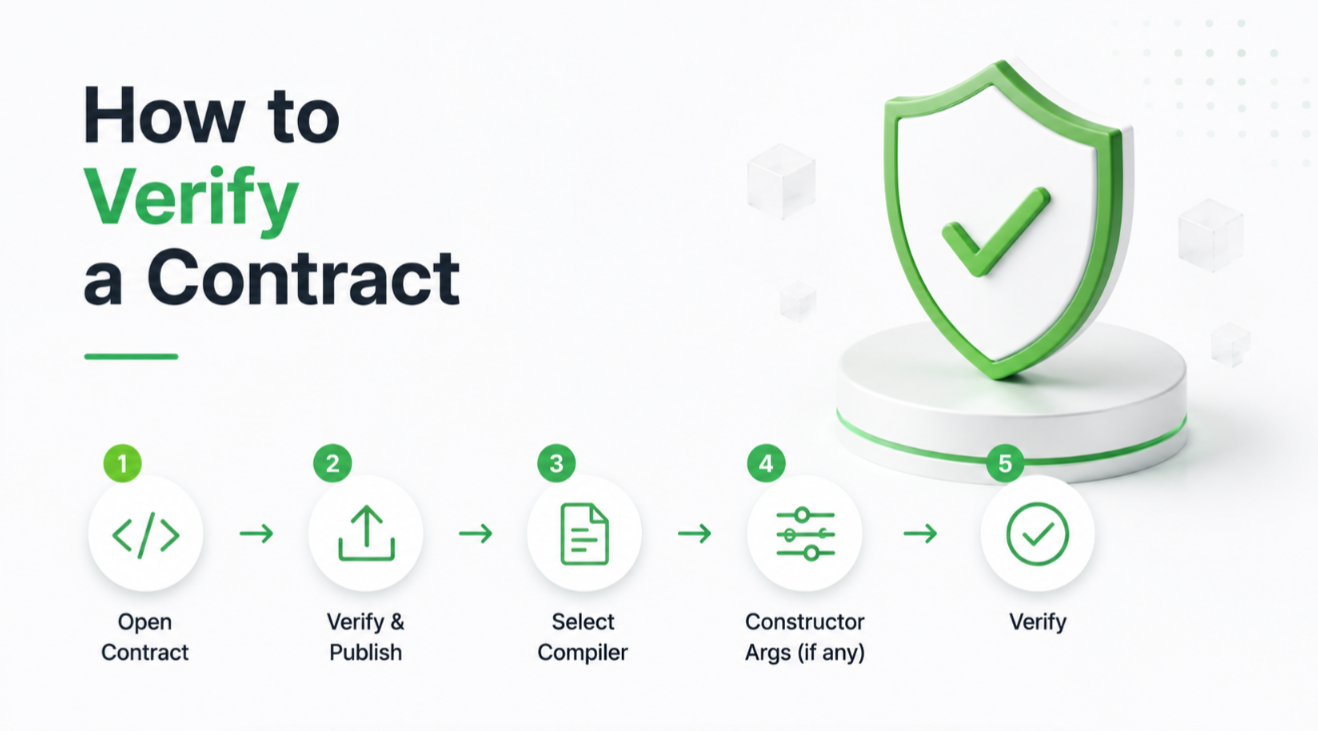
1. Upload the source code (usually one or more .sol files, potentially with all imports). 2. Specify the exact compiler version used (e.g., Solidity 0.8.20). 3. Specify optimizer settings (whether the optimizer was enabled and how many runs). 4. Provide constructor arguments (the values passed to the constructor at deployment).
Etherscan compiles the submitted source with the specified settings and checks that the result matches the deployed bytecode. If it matches, the contract is verified and the source becomes publicly visible.
If it doesn't match, verification fails. Common reasons:
- Wrong compiler version (0.8.20 vs 0.8.19)
- Wrong optimizer settings
- Missing or wrong constructor arguments
- Different import paths
For deployers, using tools like Hardhat or Foundry with the `verify` plugin automates this. For manual verification, Etherscan has a step-by-step form.
Multi-file and library-heavy contracts
Most production contracts import from libraries — OpenZeppelin ERC-20 base, upgradeability patterns, math libraries, etc. Verifying a contract with imports requires supplying all the imported files.
Etherscan supports:
- **Single-file mode**: paste one file with all imports flattened into one.
- **Multi-file mode**: upload each file separately, preserving import structure.
- **Standard JSON**: upload a JSON file (compatible with what Hardhat/Foundry produce) that includes source, settings, and configuration.
Standard JSON is the most reliable path. It's what deployment tools generate and it captures all the specifics needed for reproducible compilation.
Verifying a proxy contract
If your contract is a proxy that delegates logic to an implementation contract, verification is more complex:
1. Verify the proxy contract itself (this is straightforward if it's a standard proxy pattern like OpenZeppelin's). 2. Verify the implementation contract. 3. Link them on Etherscan by clicking "This is a proxy" on the proxy's page and specifying the implementation address.
Once linked, users viewing the proxy contract can click "Read as Proxy" or "Write as Proxy" to interact via the implementation's ABI.
If a proxy's implementation is upgraded later, you need to verify the new implementation and update the link.
Verifying with Sourcify
Sourcify is an alternative verification service that offers "perfect matches" (a stricter form of verification that also checks metadata and file hashes). It's used by some tools and integrated into a few block explorers.
For most Ethereum projects, Etherscan verification is the standard and sufficient. Sourcify is a nice complement, especially for projects deploying across many chains.
Verifying across chains
Etherscan operates block explorers on many chains: Ethereum, Arbitrum (Arbiscan), Optimism (Optimistic Etherscan), Base (Basescan), Polygon (Polygonscan), BNB Chain (BscScan), and others. Each has its own verification portal.
To verify on multiple chains, you verify separately on each. Because the same contract typically has the same bytecode on all chains (deployed with the same source and settings), the verification submission is nearly identical across explorers.
For teams deploying to many chains, tools like Hardhat's multi-chain verify plugin automate the process.
Checking someone else's verification
When you land on an Etherscan page for an unknown contract:
1. Look for the green checkmark next to "Contract Source Code Verified" at the top of the Contract tab. 2. If verified: skim the source. Look for: - Constructor and initialization functions (what state was set at deployment) - Admin/owner functions (who can change what) - Upgrade functions (can the contract be replaced) - Mint/burn functions (can token supply change) 3. Check the "Contract Creator" — who deployed it. Cross-reference with known addresses of the project. 4. Look at the transaction count — has this contract been used, or is it new?
Unverified? Assume risk until proven otherwise. Unverified contracts holding real value are either very new or a red flag.
When verification is legitimately delayed
Some projects delay verification briefly:
- Newly deployed contracts might not be verified for hours or days as the team focuses on launch.
- Contracts deployed via factory patterns (each user gets a personal contract) might not be individually verified — instead, the factory is verified and each instance is identifiable via its parent.
- Contracts with proprietary logic might delay verification to prevent copycats.
But a project that never verifies its contracts, or that offers implausible reasons for keeping them opaque, is a red flag. Reputable projects verify quickly.
Verifying your own contract
For a developer deploying a new contract:
1. Use Hardhat or Foundry (both have verify plugins). 2. Configure your deployment script to record the compiler settings, constructor args, and libraries. 3. After deployment, run the verify command: - Hardhat: `npx hardhat verify --network <NETWORK> <ADDRESS> <ARG1> <ARG2>` - Foundry: `forge verify-contract <ADDRESS> <CONTRACT_PATH> --etherscan-api-key <KEY>` 4. If successful, Etherscan displays the source publicly. If it fails, adjust settings and retry.
For contracts deployed manually or with unusual toolchains, use Etherscan's web UI for verification. It's slower but works.
What comes after verification
Verified source is the baseline for security review. Once verified, professional audit firms can review the source. Users can inspect it. Automated tools can analyze it. Bug bounties can be evaluated against it.
None of this happens for unverified contracts. Verification is the entry ticket to being part of the reviewable, auditable ecosystem.
The one-sentence version
If you're a developer, verify your contracts immediately after deployment. If you're a user, treat unverified contracts as high-risk and check verification status before interacting with any contract holding meaningful value.