A single-signature Bitcoin wallet — one key, one seed phrase — has one failure mode that matters: lose the key, lose the coins. Multisig replaces the single point of failure with a threshold: multiple keys, some of which must sign for any transaction. The math is simple. The operational reality is harder than it sounds, and picking the right multisig configuration is where most self-custody discussions go wrong.
Threshold notation
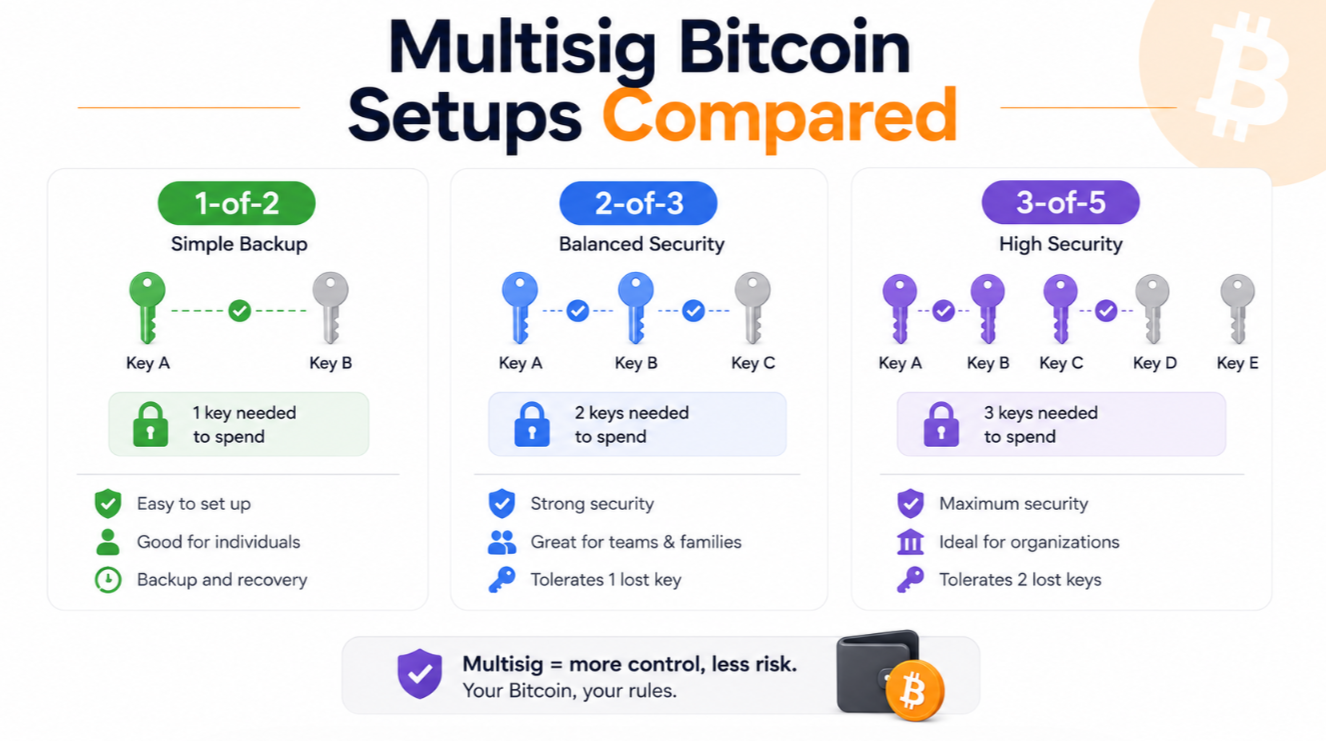
Multisig is written as N-of-M: N signatures required, out of M total keys. 2-of-3 means three keys exist, any two of which can spend. 3-of-5 means five keys, any three required.
The interesting thresholds:
- **1-of-2** is not a security setup; it is a convenience redundancy. Either key alone can spend, so both must be equally protected.
- **2-of-2** requires both keys, offering strong protection against theft but a hard failure mode if either is lost.
- **2-of-3** is the most common self-custody setup — the sweet spot for one person.
- **3-of-5** adds more redundancy and is often used for family or business accounts.
- Higher thresholds (4-of-7, 5-of-9) exist in institutional contexts but rarely make sense for individuals.
The 2-of-3 for one person
A 2-of-3 multisig gives you three keys and requires any two to move funds. The canonical setup: one key on a hardware wallet you use daily (Ledger, Coldcard, Trezor), one on a second hardware wallet stored somewhere physically separate (a safe deposit box, a family member's home), and one held by a collaborative custody service or on a third device stored somewhere else entirely.
To spend, you need two of the three. If one device is stolen, the thief cannot spend (they still need a second key). If one device is lost or destroyed, you use the remaining two to spend and to rotate keys. If two devices are compromised simultaneously, you have a real problem — but that is a two-location compromise, which is meaningfully harder than compromising a single-sig setup.
The tradeoff: setup complexity is real. You have to generate three seeds securely, back up three seeds, understand which is which, and be able to walk through a recovery in the middle of a bad day. Practicing a spend from cold storage every 6-12 months is not optional; it is how you catch a broken backup before you actually need it.
The 3-of-5 for family or business
A 3-of-5 raises the threshold and the total key count. This makes more sense when there are multiple humans involved — spouses, business partners, an estate plan — because you can distribute keys such that no single person can spend, but any three of five can.
Example distribution: you hold two keys (daily-use hardware wallet + geographically separated backup), your spouse holds one, a family member holds one, a collaborative custody service holds one. To spend, some combination of three is needed. To lose funds, three keys would have to be simultaneously destroyed or lost — a very high bar.
The tradeoff is coordination. Every spend requires more people, or more devices, or both. Estate planning gets complex because you need to document who holds what and what happens on your death. Some collaborative custody services (Casa Estate Plan, Unchained Inheritance) are specifically designed around this scenario.
Collaborative custody: the middle path
"DIY multisig" means you generate and control all keys yourself. "Custodial" means someone else holds them all. "Collaborative custody" means a service (Casa, Unchained, Nunchuk) holds one of your multisig keys and adds infrastructure — inheritance features, mobile app, recovery assistance, dispute resolution — while you hold the majority.
The most common collaborative setup is a Casa 2-of-3 or 3-of-5 where Casa holds one key. They cannot spend alone; you always retain enough keys to be sovereign. If you die, they help your heirs recover using documented processes. If your local hardware fails, they help you rotate to new hardware.
The tradeoff: monthly fees (Casa is $10-250/month depending on plan) and a modest privacy cost — Casa knows your setup exists and knows your key configuration. In exchange you get real support and real institutional continuity, which most solo self-custodians underestimate the value of until they need it at 2 AM.
Wallet software: the practical question
Multisig setup requires wallet software that supports coordinating between multiple keys. The good options in 2026:
- **Sparrow Wallet** (desktop, open-source): most-recommended DIY tool. Deep multisig support, PSBT-native, works with every major hardware wallet.
- **Nunchuk** (mobile + desktop, open-source): good UX for mobile-first users. Collaborative multisig features.
- **Specter Desktop** (desktop, open-source): more advanced, more manual, favored by power users.
- **Casa / Unchained apps** (mobile): custodial-assisted, easiest for beginners but not open-source.
Wallet software matters more than most people realize — a bad wallet during a stressful recovery scenario is what causes actual fund loss. Test the wallet you plan to use before committing significant funds.
The recovery test
The single most important thing about any multisig setup is that you have verified you can recover from it. This means: within a week of setup, spend a small amount of Bitcoin using each combination of keys that would normally suffice. If it is 2-of-3, spend using keys 1+2, then 1+3, then 2+3. This proves every backup works and every wallet configuration is functional.
Do this again every 6-12 months. Hardware wallets die, seed phrases get destroyed, wallet software updates change compatibility. Regular recovery drills are the difference between having multisig and having security theater.
What multisig does not protect against
Multisig protects against key loss and single-device theft. It does not protect against:
- Social engineering that gets you to sign a malicious transaction
- Phishing that tricks you into signing an approval on a fake wallet UI
- Coercion (someone with a wrench who knows where all your keys are)
- Wallet software supply-chain attacks that show you fake transaction details
For those threats you need other layers: transaction pre-simulation (Rabby-style), air-gapped signing (Coldcard, Keystone), and geographic distribution of keys with different custodians.
Multisig is a huge upgrade over single-sig, but it is not a complete security stack. It is one component in a self-custody design.
The honest recommendation
For anyone holding meaningful Bitcoin — say, more than a few thousand dollars — a 2-of-3 multisig is the sensible upgrade from single-sig. Two hardware wallets from different manufacturers in different physical locations, one collaborative custody key from Casa or Unchained. Total setup cost: a few hundred dollars in hardware plus $10-30/month for the service. Total setup time: an afternoon.
For anyone holding significantly more — six figures and above — 3-of-5 or bespoke setups with estate planning become genuinely worth the added complexity. This is also where professional help pays off: an established collaborative custody service or a Bitcoin-focused wealth advisor.
For anyone holding less than a few thousand dollars, single-sig with a good hardware wallet and a clean seed backup is fine. Multisig is not free — the operational overhead is real, and if you cannot execute a recovery under stress, multisig can lose funds that single-sig would have protected.